I just started to use FireCAD, Panel's name isn't consistent

I looked for EST4 and I found EST4 Voice Panel, CAB-7, Assembly, etc..
I chose the EST4 Assembly and named it FACU1. I deleted the block then placed a new block and named it FACU1 again. Not sure why as soon as it is placed on the drawing, it is called FACU2.
What if we made mistakes and have to delete some blocks and later on need to place new blocks? Then FireCAD will name them incorrectly?
Comments
I just used the validate devices button and after it was used, the blocked turned to FACU2 and 3 even though they were named FACU1 and 2.
I was suspecting the system to work like this. I like this as it keeps things consistent etc... However, how do I grab the FACU1 panel back since it was already deleted?
Blocks*
Run a purge up in the Firecad ribbon. Even though you deleted the block it is still kind of in the system until it is purged.
it worked.
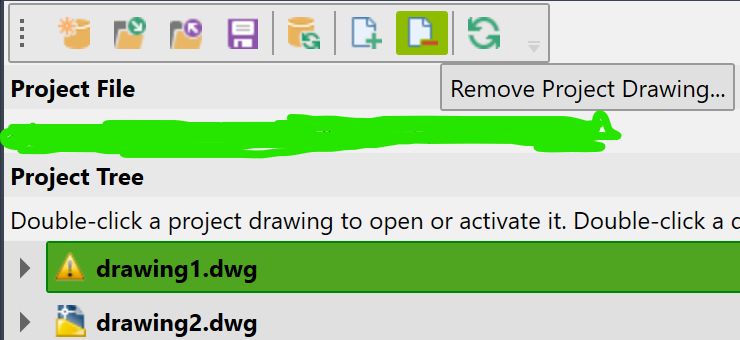
at the project tree, i used to 2 autocad files there, i deleted one but the project tree is still showing the name of the one i deleted. how do i get rid of it from the project tree? i right clicked but saw no option to delete the one that doesn't exist anymore in the project tree.
Select the drawing file and then click the remove project drawings.
also, in the videos, i do not see firecad showing how to connect to a fire alarm control panel to an nac1, then nac2 to nac1, nac3 to nac2, and so on. i tried every circuit in the est4 so far and nothing light up the nac showing that i could connect the facu/facp to the nac.
how do i connect an est4 to an nac and all the nacs together in a series?
Please sign in to leave a comment.