
Preview: new in the next FireCAD release, planned for December 1, and in the beta available now.
Overview
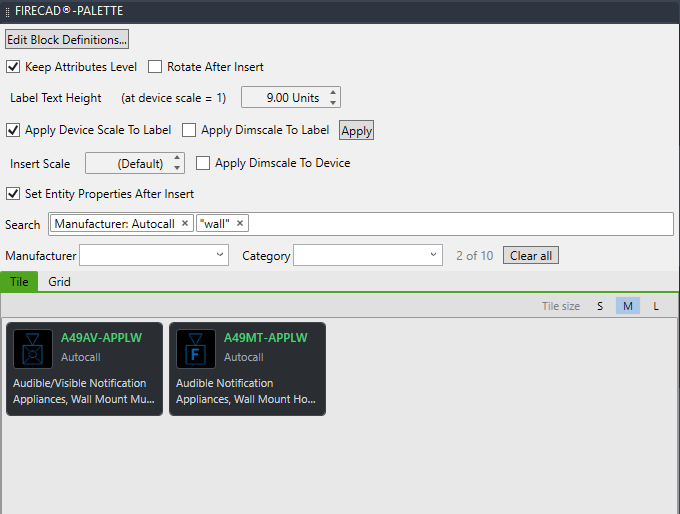
The device palette filters as you type. Every word you type must match, so typing more narrows the list. Terms you want to keep become chips inside the search box, and the Manufacturer and Category pulldowns add a chip for you. Search works the same way in Tile and Grid view.
Searching
- In the FireCAD palette, click the Device Palette tab
- Click in the search box (Type to search...) and type. The list filters as you go
- Press Enter to keep the text as a chip, so you can type the next term. Press Escape to drop the text you are typing
- Click the x on a chip to remove it, or Clear all to start again
A chip shows the field it searches, for example Manufacturer: Autocall. The count beside the pulldowns, such as 2 of 10, shows how many parts match out of all the parts in the palette.
Each word is searched across part number, description, manufacturer, category, product line and the part's tags. Matching ignores upper and lower case and matches part of a word, so strob finds strobes.
Search Syntax
| You type | It finds |
|---|---|
strobe wall |
Parts matching both words |
"horn strobe" |
The phrase, not the two words separately |
-ceiling or !ceiling
|
Parts that do not match ceiling |
mfr:notifier |
Parts from that manufacturer only |
mfr:"system sensor" |
A field value with a space in it, in quotes |
cat:strobe |
Parts in a matching category |
pn:p2rl |
Parts whose part number contains p2rl |
desc:wall |
Parts whose description contains wall |
line:onyx |
Parts in a matching product line |
prop:wp |
Parts with a matching tag, such as the WP weatherproof marker |
The field names also work spelled out: manufacturer:, category: and part:.
Two terms on the same field match either one: mfr:notifier mfr:edwards shows both manufacturers. Every other combination must all match.
A prefix FireCAD does not know is searched as text, so a part number such as 4100: still works.
Pulldowns
-
Manufacturer and Category list the values in the project's catalog. Picking one adds a chip, the same as typing
mfr:orcat: - Pick more than one manufacturer to see parts from all of them
Tips
- Search on the shortest distinctive part of a model number, such as
E3,B200SorTCPA. A long exact string with a prefix or suffix that the catalog spells differently finds nothing - If a part you expect is missing, see Finding a Part in the Catalog: it may be filed under a parent or sister brand
- The tile size buttons switch between large, medium and small tiles. Small tiles show the part number and manufacturer, so more fit on screen
Related Commands
FireCAD is the industry-leading AutoCAD add-in for fire alarm system design — from circuit layout to wire routing to code-compliant reports.
Learn more and get started at getfirecad.com →
Inspect Point Integration — Fire alarm system device lists and bill of materials can be pushed directly from FireCAD into Inspect Point, eliminating manual data entry and ensuring every device is ready for inspection scheduling and ongoing asset management.
Learn more here →